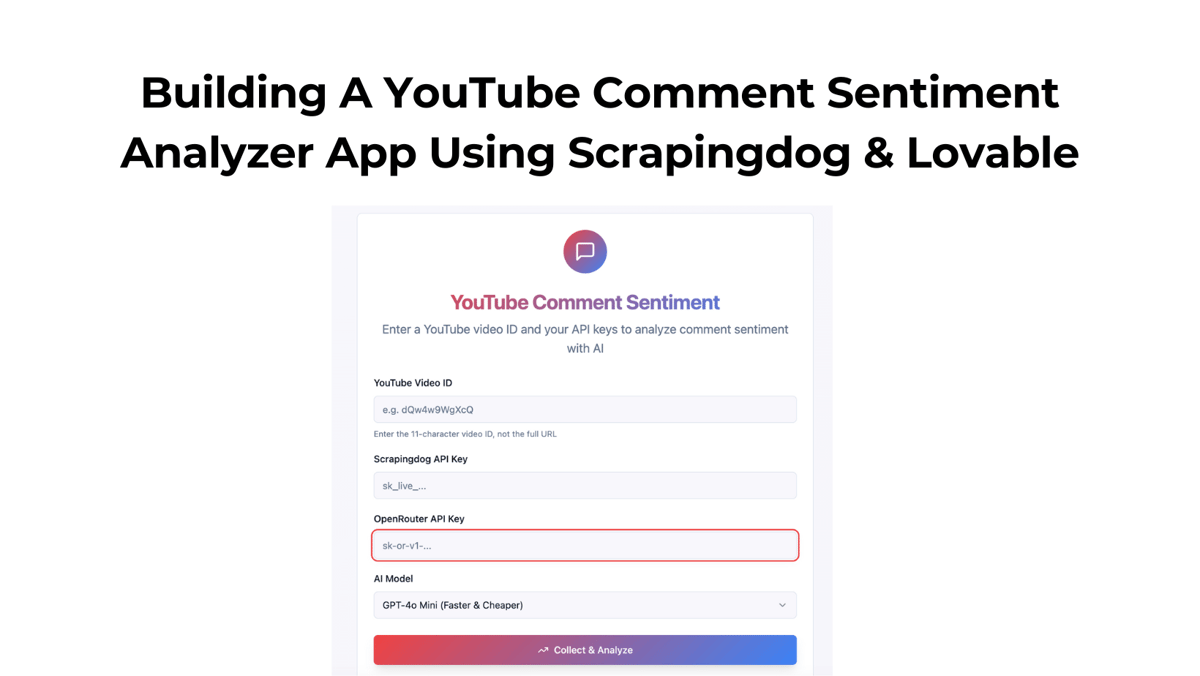
In this tutorial, we will build a simple app that performs sentiment analysis on all comments of a YouTube Video after aggregating them.
To build this app, we have used
Scrapingdog’s YouTube Comments API (Get 1000 Free Credits for First Time SignUp)
Lovable (Get 5 Free Credits Daily)
I have used ChatGPT to build the prompt, and here it is: -
1Title: YouTube Comment Sentiment (1‑Paragraph Summary)2 3Goal:4Build a minimal Next.js app that:5 6Accepts a YouTube video ID (not the full URL) and two API keys entered on the frontend (Scrapingdog + OpenRouter).7 8Fetches all comments via Scrapingdog (10 per page with next_page_token).9 10Uses OpenRouter → OpenAI gpt‑4o / 4o‑mini to produce exactly one paragraph (≤120 words) summarizing overall sentiment.11 12No DB, no Supabase, no persistence; do not log keys.13 14Key UX:15 16Inputs: videoId, scrapingdogApiKey, openrouterApiKey, model (default openai/gpt-4o-mini, option openai/gpt-4o).17 18Button: Analyze Sentiment.19 20Show simple “Analyzing…” progress text while running.21 22Output: one paragraph only (no bullets, no tables, no per‑comment output).23 24Implementation:25 26Use Next.js App Router.27 28Frontend sends keys to backend per request; backend uses them only in memory.29 30Backend performs hierarchical summarization (chunk → mini summaries → final synthesis).31 32Basic backoff/retry, safe chunk size (~4000 chars).33 34Validate video ID (not URL).35 36Clamp final text to a single paragraph (≤120 words).37 38Create these files391) app/page.tsx40tsx41Copy42Edit43"use client";44import { useState } from "react";45 46const YT_ID_RE = /^[A-Za-z0-9_-]{11}$/; // Standard YouTube ID length is 1147 48export default function Home() {49 const [videoId, setVideoId] = useState("");50 const [scrapingdogApiKey, setScrapingdogApiKey] = useState("");51 const [openrouterApiKey, setOpenrouterApiKey] = useState("");52 const [model, setModel] = useState("openai/gpt-4o-mini");53 const [loading, setLoading] = useState(false);54 const [summary, setSummary] = useState("");55 const [error, setError] = useState("");56 57 async function handleRun() {58 setError("");59 setSummary("");60 if (!YT_ID_RE.test(videoId)) {61 setError("Enter a valid YouTube video ID (11 characters, not a full URL).");62 return;63 }64 if (!scrapingdogApiKey || !openrouterApiKey) {65 setError("Both API keys are required.");66 return;67 }68 setLoading(true);69 try {70 const res = await fetch("/api/run", {71 method: "POST",72 headers: { "Content-Type": "application/json" },73 body: JSON.stringify({ videoId, scrapingdogApiKey, openrouterApiKey, model }),74 });75 const data = await res.json();76 if (!res.ok) throw new Error(data?.error || "Failed");77 setSummary(data.summaryParagraph || "");78 } catch (e: any) {79 setError(e?.message || "Something went wrong");80 } finally {81 setLoading(false);82 }83 }84 85 return (86 87 YouTube Comment Sentiment88 89 Enter the video ID (not the full URL), add your API keys, and get a single-paragraph sentiment summary.90 91 92 93 YouTube Video ID94 setVideoId(e.target.value.trim())}95 />96 97 98 99 Scrapingdog API Key100 setScrapingdogApiKey(e.target.value)}101 type="password"102 />103 104 105 106 OpenRouter API Key107 setOpenrouterApiKey(e.target.value)}108 type="password"109 />110 111 112 113 Model114 setModel(e.target.value)}115 >116 openai/gpt-4o-mini (cheaper)117 openai/gpt-4o118 119 120 121 122 {loading ? "Analyzing…" : "Analyze Sentiment"}123 124 125 {error && {error}}126 {summary && (127 128 {summary}129 130 )}131 132 );133}1342) app/api/run/route.ts135ts136Copy137Edit138import { NextRequest, NextResponse } from "next/server";139 140export const dynamic = "force-dynamic";141 142type Comment = { id: string; text: string; author?: string; published_at?: string };143 144const OPENROUTER_BASE = "https://openrouter.ai/api/v1";145const DEFAULT_MODEL = "openai/gpt-4o-mini"; // switch to "openai/gpt-4o" via UI if desired146const YT_ID_RE = /^[A-Za-z0-9_-]{11}$/; // require ID not URL147 148// 1) Fetch ALL comments via Scrapingdog (10 per page) using next_page_token149async function fetchAllComments(150 videoId: string,151 scrapingdogApiKey: string152): Promise {153 const base = "https://api.scrapingdog.com/youtube/comments";154 let token: string | undefined = undefined;155 const out: Comment[] = [];156 157 // Page through until next token is exhausted158 while (true) {159 const params = new URLSearchParams({ api_key: scrapingdogApiKey, video_id: videoId });160 if (token) params.set("next_page_token", token);161 const url = `${base}?${params.toString()}`;162 163 const res = await fetch(url, { method: "GET", cache: "no-store" });164 if (!res.ok) {165 const txt = await res.text().catch(() => "");166 throw new Error(`Scrapingdog ${res.status}: ${txt || res.statusText}`);167 }168 const data = await res.json();169 170 const items: any[] = data?.comments || [];171 for (const c of items) {172 const id = c?.comment_id ?? c?.id;173 const text = c?.text_original ?? c?.text ?? "";174 if (!id || !text) continue;175 out.push({176 id: String(id),177 text: String(text),178 author: c?.author_display_name,179 published_at: c?.published_at,180 });181 }182 183 token = data?.scrapingdog_pagination?.next ?? data?.next_page_token ?? undefined;184 185 // gentle pacing186 await new Promise((r) => setTimeout(r, 120));187 188 if (!token) break;189 }190 191 // Deduplicate by comment_id192 return Array.from(new Map(out.map((c) => [c.id, c])).values());193}194 195// 2) OpenRouter helper196async function callOpenRouter({197 apiKey,198 model,199 system,200 user,201 temperature = 0,202}: {203 apiKey: string;204 model: string;205 system: string;206 user: string;207 temperature?: number;208}): Promise {209 const res = await fetch(`${OPENROUTER_BASE}/chat/completions`, {210 method: "POST",211 headers: {212 Authorization: `Bearer ${apiKey}`,213 "Content-Type": "application/json",214 "HTTP-Referer": "https://yourapp.local", // attribution (any string)215 "X-Title": "YouTube Sentiment",216 },217 body: JSON.stringify({218 model,219 temperature,220 messages: [221 { role: "system", content: system },222 { role: "user", content: user },223 ],224 }),225 });226 227 if (!res.ok) {228 const txt = await res.text().catch(() => "");229 throw new Error(`OpenRouter ${res.status}: ${txt || res.statusText}`);230 }231 const json = await res.json();232 return json?.choices?.[0]?.message?.content?.trim() || "";233}234 235// 3) Chunk comments and summarize (hierarchical)236function chunkCommentsByChars(comments: Comment[], maxChars = 4000): string[] {237 const chunks: string[] = [];238 let buf = "";239 240 for (const c of comments) {241 const line = (c.text || "").replace(/\s+/g, " ").trim();242 if (!line) continue;243 if ((buf.length + line.length + 4) > maxChars) {244 if (buf) chunks.push(buf);245 buf = line;246 } else {247 buf = buf ? `${buf}\n---\n${line}` : line;248 }249 }250 if (buf) chunks.push(buf);251 return chunks;252}253 254const CHUNK_SYSTEM = `You are a precise sentiment summarizer. Output plain text only. No lists, no headings, no JSON.`;255const CHUNK_USER_TEMPLATE = (commentsPlain: string) => `256You will see a batch of YouTube comments (raw text).257Write a concise 2–3 sentence summary of the sentiment and main themes in neutral, professional tone.258Handle slang, emojis, sarcasm, and mixed opinions.259Output plain text only. No bullets, no labels, no JSON.260261Comments:262${commentsPlain}263`.trim();264 265const FINAL_SYSTEM = `You are a precise sentiment summarizer. Output exactly one paragraph ( `266You will see multiple short summaries, each representing a subset of YouTube comments from the same video.267Synthesize them into EXACTLY ONE PARAGRAPH ( mini summaries268 const chunks = chunkCommentsByChars(comments, 4000);269 const miniSummaries: string[] = [];270 for (const chunk of chunks) {271 try {272 const mini = await callOpenRouter({273 apiKey: openrouterApiKey,274 model: modelToUse,275 system: CHUNK_SYSTEM,276 user: CHUNK_USER_TEMPLATE(chunk),277 temperature: 0,278 });279 if (mini) miniSummaries.push(mini);280 await new Promise((r) => setTimeout(r, 200)); // gentle pacing281 } catch {282 // one retry283 const mini = await callOpenRouter({284 apiKey: openrouterApiKey,285 model: modelToUse,286 system: CHUNK_SYSTEM,287 user: CHUNK_USER_TEMPLATE(chunk),288 temperature: 0,289 });290 if (mini) miniSummaries.push(mini);291 }292 }293 294 // 3) Final synthesis -> EXACTLY one paragraph (The output you will get would be something similar to this: -

Here is the public link that you can use to test our setup.
OpenRouter is essentially the same as ChatGPT, but it is an aggregator of AI models, including ChatGPT, and in this way, I have access to all LLM models from a single dashboard.
Let’s start building this App!! Here is a quick walkthrough video of this tutorial.
If you would like to read text & build this from scratch, read along.
After successfully signing up on Lovable, you need to paste the prompt that I just gave to it.

The tool will take some time and prepare a unique link for your tool.
From there on, you would need a video ID, the Scrapingdog’s & OpenRouter’s API Key.
A video ID is part of the YouTube URL that is unique to every video. And this is one of the parameters that is used by the YouTube comment API.

You can find your Scrapingdog’s unique key on the dashboard.

And finally, the OpenRouter Key, once you have an account on it, you need to top it up with some real money to get credits. Create a unique key from their dashboard.

Alright, here’s how the tool would work when you have all the parameters filled in there.
And this way, you can use Scrapingdog’s YouTube Comment API in this specific use case. We do have more dedicated endpoints for YouTube & Google APIs.
